Setting Up Narcotic Pickup Receipts
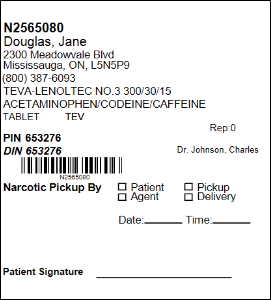
To document the pick up of narcotic and controlled medications, a narcotic pickup receipt can be printed on your half or thermal labels. On the pickup receipt, the following can be recorded:
-
Patient or agent's name
-
Patient or agent's signature
-
Date and time of the pickup
You can batch scan the pickup receipt to quickly attach it to the associated prescription number.
Half Labels
To print a narcotic pickup receipt for a half label, the From Your Pharmacist section on the label is used.
To format the From Your Pharmacist section:
-
Select More > Pharmacy.
-
Select the Rx Detail tab.
-
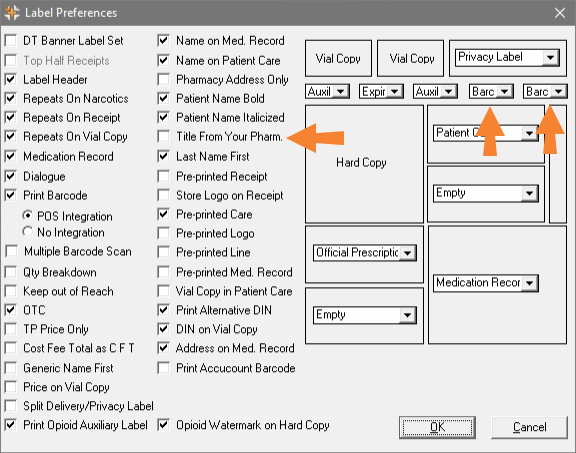
Select Preferences. The Label Preferences window opens.
-
Uncheck the Title From Your Pharm. preference, if it is not already turned off.
-
Confirm the Print Barcode preference is checked on and a barcode is set to print on a white auxiliary label.
The barcode will be affixed to the narcotic pickup receipt. If you normally use one barcode for prescriptions, set a second barcode to print on another auxiliary label position. The barcodes should be positioned on a white label to ensure they print cleanly.
-
Select OK.
-
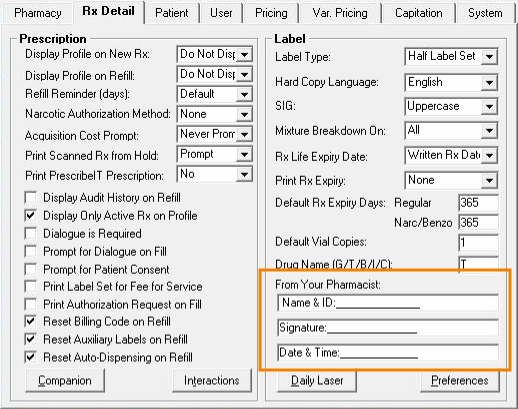
In the From Your Pharmacist section, enter the following in the 3 lines provided:
-
Line 1: enter 1 space and then type "Name & ID" followed by a colon (:) and a continuous underscore (_) until the character limit has been reached.
-
Line 2: type "Signature" followed by a colon (:) and a continuous underscore (_) until the character limit has been reached.
-
Line 3: type "Date & Time" followed by a colon (:) and a continuous underscore (_) until the character limit has been reached.
To enter a continuous underscore, hold the Shift and - buttons on your keyboard at the same time. When the character limit has been reached, no additional characters are added on the line.
-
-
Select Save. The information prints on the From Your Pharmacist section at the right side of the label. When a narcotic prescription is filled, affix the barcode to the left of the information entered in the From Your Pharmacist section. The patient or agent can manually fill in the required information on the pickup receipt.
 Half Label Narcotic Pickup Receipt Sample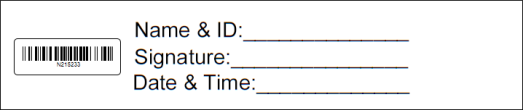
Thermal Labels
For thermal labels, a label preference is used for printing narcotic pickup receipts.
To turn on the Narcotic Pickup Receipt preference:
-
Select More > Pharmacy.
-
Select the Rx Detail tab.
-
Select Preferences. The Label Preferences window opens.
-
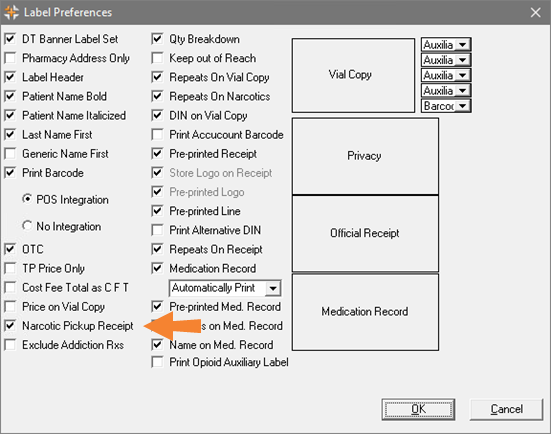
Check on the Narcotic Pickup Receipt preference.
-
Select OK.
-
Select Save. The narcotic pickup receipt prints alongside the privacy label, official receipt, and medication record when a narcotic prescription completes Workflow. The patient or agent can manually fill in the required information on the pickup receipt.